

Employer training begins soon, and we're looking forward to seeing you
To help you get the most from your hands-on training session, please review the attached Employer Training Readiness Checklist and complete each item before your scheduled training session.
Completing these steps in advance will help ensure you're ready to participate in the hands-on activities and avoid delays during class.
Employer Portal Access
If you are registered for an upcoming in-person training session, your Employer Portal account has been established and is ready for use.
Your email address serves as your Employer Portal username. Before attending training, please complete your PingID authentication using the attached OP&F Quick Reference PingID (mobile) and First-Time Login.
After completing the authentication process, verify that you can successfully access the Employer Portal and see the home page below.
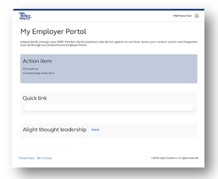
If you experience issues with PingID enrollment, authentication, or access to the Employer Portal, please contact the Client Technology Center at 1-800-861-8700 for assistance before your scheduled training session. Addressing access issues in advance will help ensure you are able to fully participate in the hands-on training activities.
If your organization requires administrative approval to install the PingID desktop application, or if you experience firewall or permission restrictions, please work with your local IT department before your training session. You can find the PingID Quick Reference Guide for desktop on the Employer Knowledge Hub.
Please note, if you are registered to attend the virtual training session, readiness guidance will be provided in September.
What to Expect During Training
Training is designed to be interactive and hands-on. During your session, you'll have the opportunity to:
• Navigate the Employer Portal
• Submit Member Data Reports (MDR)
• Submit Work History Reports (WHR)
• Review validation messages
• Complete corrections and payroll adjustment scenarios
• Explore payment functionality
You'll participate in live demonstrations, guided practice activities, and hands-on exercises using the Employer Portal.
Additional Resources
Additional Employer Readiness resources are available through the Employer Knowledge Hub, including:
• Webinar recordings
• Frequently Asked Questions (FAQs)
• Quick Reference Guides
• Training materials
• Employer Readiness communications
Employer Support: EmployerNPAS@op-f.org
We look forward to seeing you during training and helping you prepare for a successful transition to the new Employer Portal.
Posted 8/14/2026